Question Nodes vs. Topic Inputs In Copilot Studio

Question nodes and topic input variables in Copilot Studio have similar abilities to extract specific information from a user’s message. This leads developers to ask “when should I use each one and why?” In this article, we will explore the important differences in their setup and usage to understand the benefits of each approach.
1. Pre-Defined Entities vs. Input Descriptions
Question nodes use set types (called entities) to find specific information in a user’s response.
For example, if the chosen entity is “Email” and the user writes, “The email on my account is [email protected],” the system will recognize “[email protected]” and store it in a variable called varEmailAddress.
If the system does not find an email address in the message, it will trigger the retry behavior and repeat the same question.
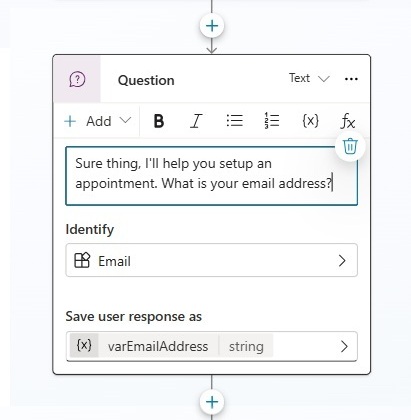
The following list of pre-defined entities are available for use in question nodes.
| Age, Boolean, City, Color, Continent, Country or region, Date and time, Email, Event, Integer, Language, Money, Number, Ordinal, Organization, Percentage, Person name, Phone number, Point of interest, Speed, State, Street address, Temperature, URL, Weight, Zip code |
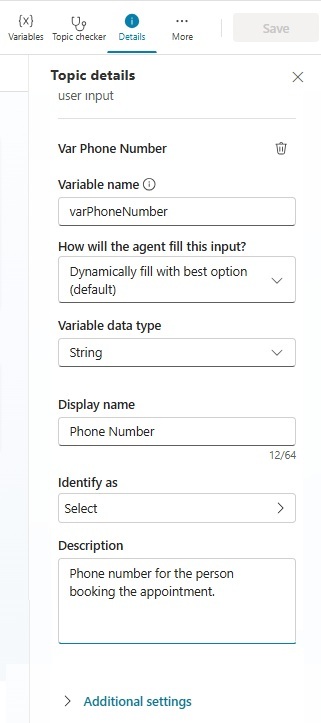
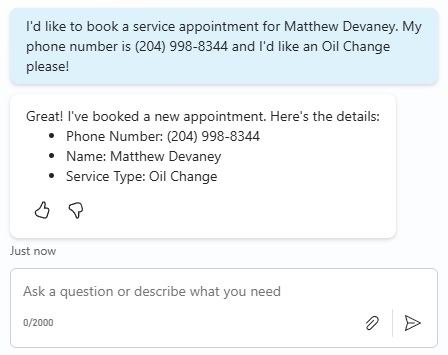
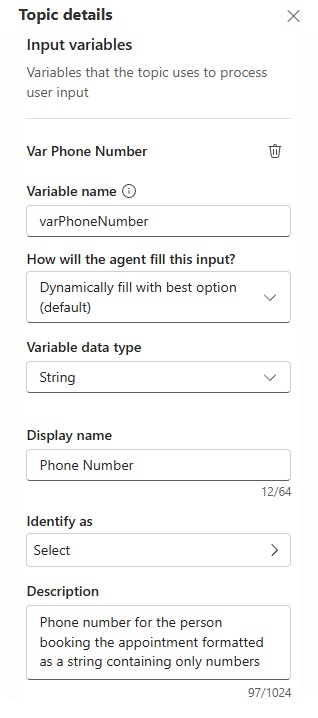
A topic input variable uses its description to determine what information to extract from a user’s message. This allows greater flexibility since extraction is no longer limited by what pre-defined entities are available. Richer context can also be provided. In this example, the entity being extracted is a phone number but we can also give context that its for “the person booking the appointment.”
It is possible to use pre-defined entity types in a topic input variable, however, its not recommended when using generative orchestration mode.
2. Structured Conversations vs. Orchestrated Conversations
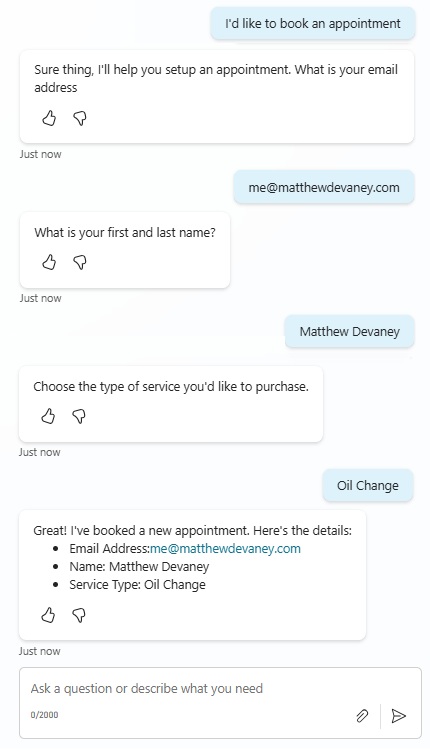
Question nodes execute a conversation according to a pre-set order. Assuming there are 3 question nodes in a topic:
- Person Name
- Multiple Choice Options (Oil Change, Full Inspection, Change Tires)
The agent will ask one question at a time and the same questions will always be asked at same point in the conversation.
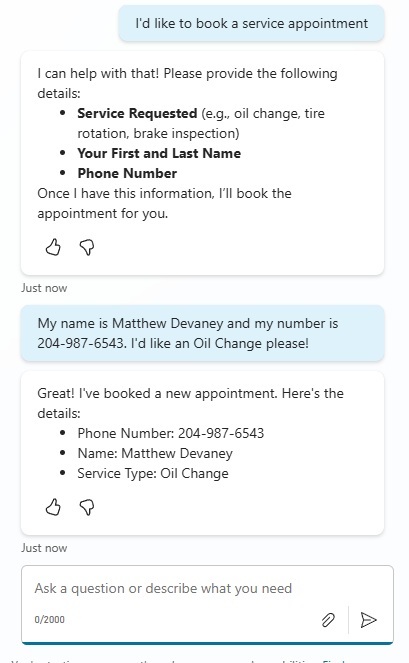
Topic input variables depend on the orchestrator to guide the conversation in the best way possible. For example, imagine a topic with these 3 input variables:
- Phone Number
- Person Name
- Service Requested
The orchestrator decides to send a single message to the user asking for all 3 pieces of information at once. It condenses its request for 3 pieces of information into a single message. This message is not pre-written by a human-being.
It’s also worth noting that in another conversation the orchestrator might decide to ask questions one by one in whatever order it chooses.
3. Skip A Question Settings vs. Auto-Detect Entities
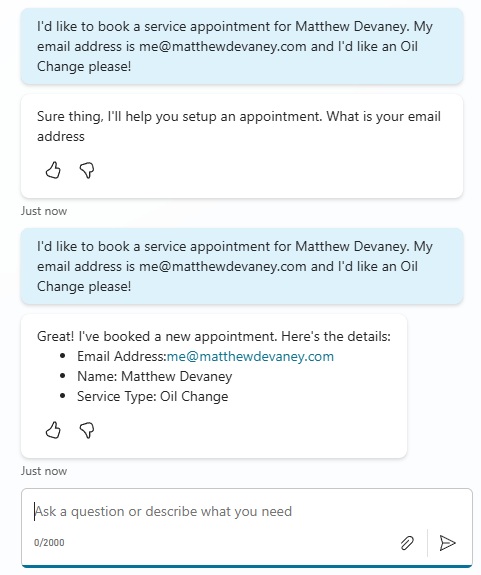
Question nodes do not have an ability to skip the first question in a topic even if the message includes the required entity type. After the agent enters the topic, any subsequent question can be skipped.
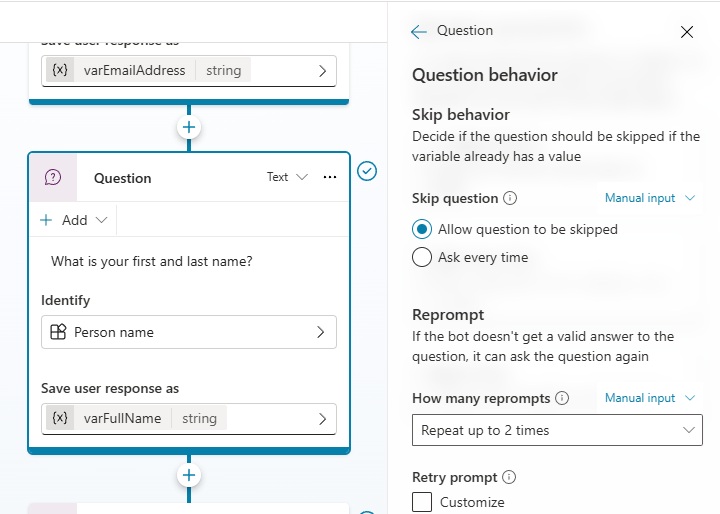
Skip question behaviour is configured within a question node’s properties menu.
Topic input variables can accept answers before entering a topic. If there are no remaining entities to be extracted it will start the topic immediately.
4. Pattern Matching Language Vs. Describing Patterns
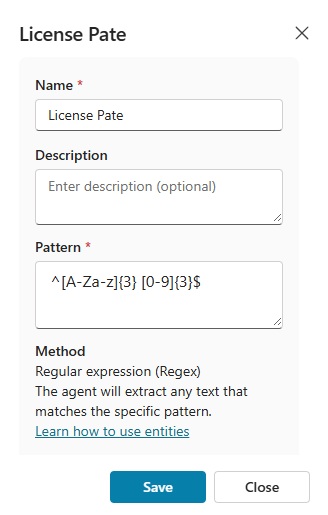
Question nodes allow custom entity types to be built for data matching a pre-defined pattern of letters, numbers and symbols. For instance, a license plate might follow a standard format of “AAA 000” where “A” represents any letter and “0” represents any single digit number.
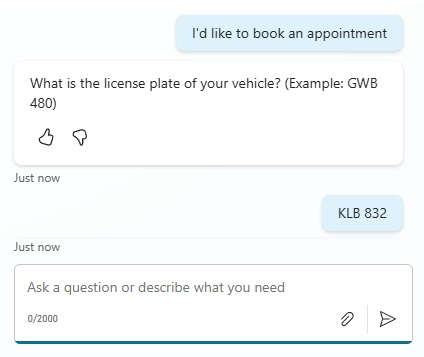
To create a new entity, select the “Identify” field then choose Create An Entity > Regular Expression. Then provide a regex pattern in the Pattern field and press Save. Now the question node will only extract values matching the provided pattern.
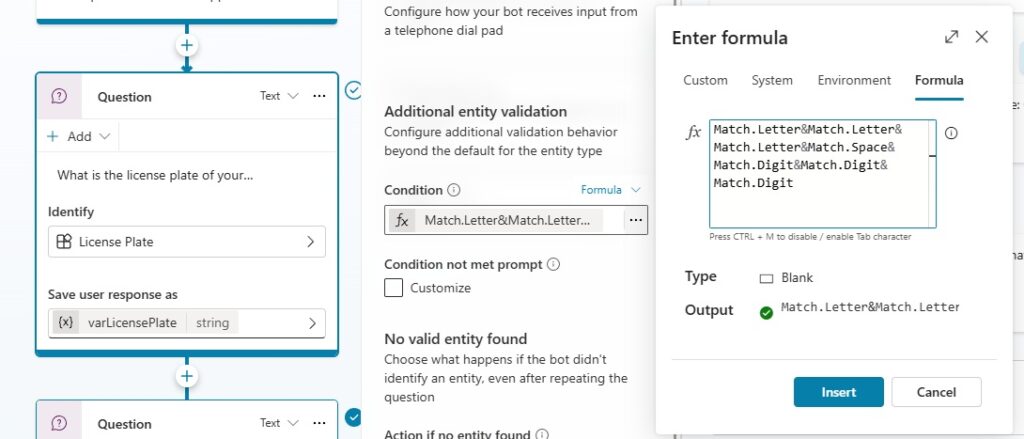
Or if PowerFx expressions are preferred, we can define a pattern matching expression in the additional entity validation field instead.
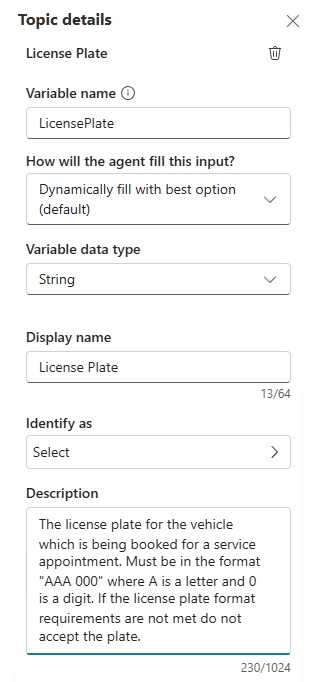
Topic input variables don’t require any knowledge of a pattern matching language. We can simply describe the pattern we want and the agent will perform the validation for itself.
5. Cleaning Extracted Entities vs. Formatting Instructions
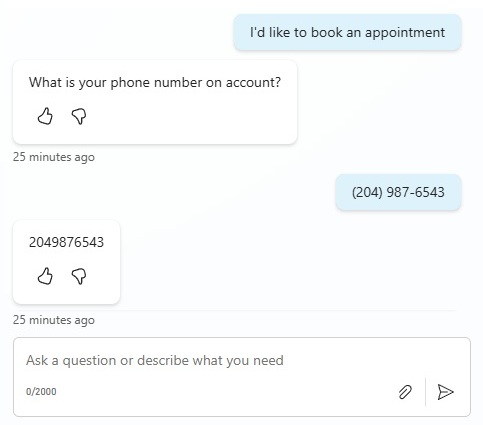
An extracted entity might need additional cleaning before it can be used in a subsequent topic node. As an example, the phone number (204) 987-6543 might need to be changed into a string of only numbers “2049876543” for lookup in a database.
Question nodes require code to clean data.
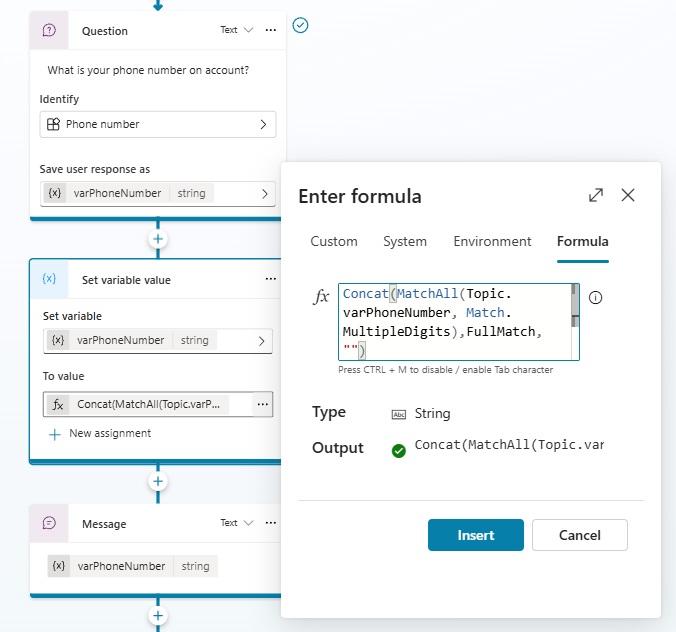
This code identifies all groups of multiple digits within the entity and joins them together into one continuous string of numbers.
Concat(
    MatchAll(
        Topic.varPhoneNumber,
        Match.MultipleDigits
    ),
    ""
)Code language: C# (cs)
Topic input variable descriptions can define the required format and use it to shape the data. No code is necessary. A phone number such as “(204) 987-6543” is passed into the topic as “2049876543” by the orchestrator.
6. Multiple Entity Types Vs. Multi-Type Input Variables
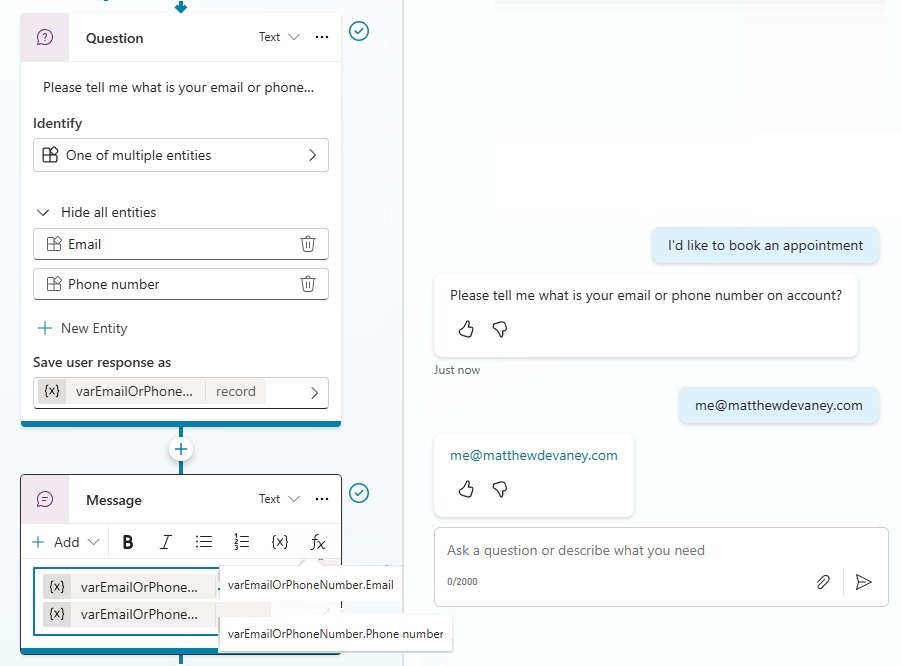
Question nodes have a special entity type named “one of multiple entities” which allows the selection of up to 5 different entity types at once. This is useful when, for example, a customer account might be identified by either an email or phone number.
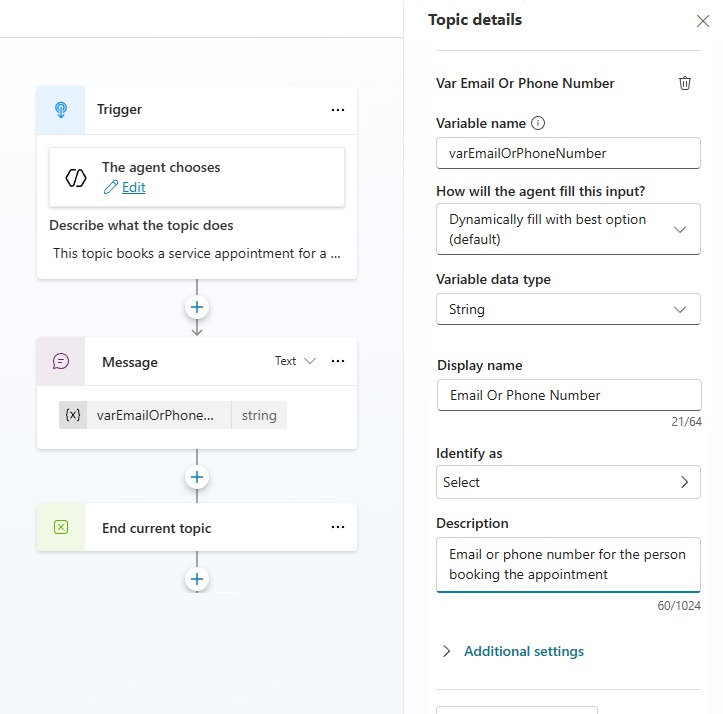
Topic input variables can accomplish the same requirement through their description, which in this case, would be “email or phone number for the person booking the appointment”.
7. Passing Arguments To A Topic Input Variable Manually
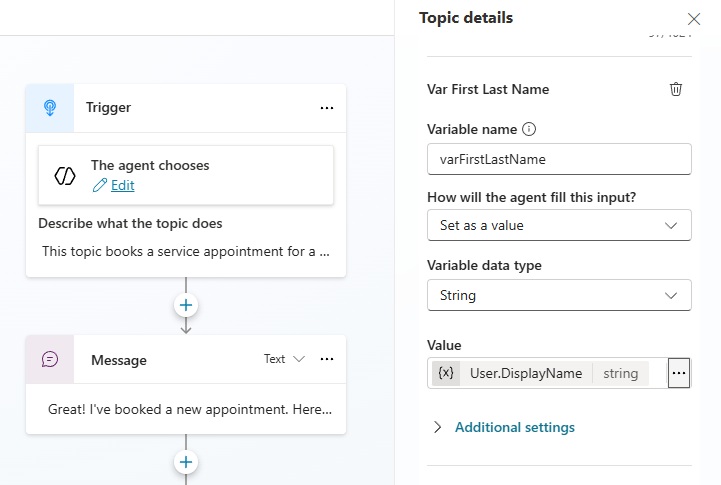
Topic input variables have the ability to be set manually by changing their “how will the agent fill this input” property to “set as value” and providing a variable reference in the value field.
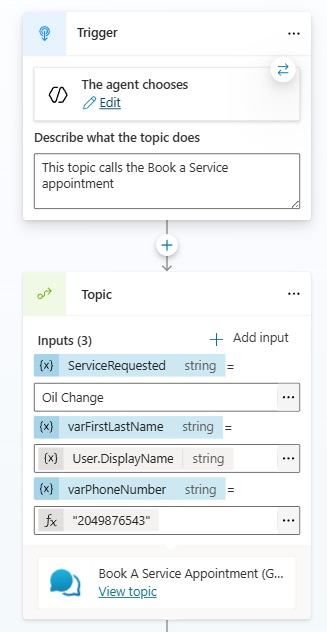
They can also be called from another topic and have values passed in as arguments. To redirect to another topic choose add a new node by going to Topic Management > Go To Another Topic > [Topic Name]
Video: Question Nodes vs. Topic Inputs In Copilot Studio
Watch this video for a full demonstration of the techniques described in this article.
Did You Enjoy This Article? 😺
Subscribe to get new Copilot Studio articles sent to your inbox each week for FREE
Questions?
If you have any questions or feedback about Question Nodes vs. Topic Inputs In Copilot Studio please leave a message in the comments section below. You can post using your email address and are not required to create an account to join the discussion.






nice overview, thank you. how would you handle spelling errors from user inputs for example if you want to compare the entry with a SharePoint List Item (Title-Field) or similar?
and if there is no direct match provide similar results (some sort of fuzzy search)?
How would you set up entity extraction and mapping for something that the user doesn’t explicitly state? For example, determining whether a client is considered B2B or consumer? Obviously, I can ask but am curious if the agent can map it based on conversation context.
Kyle,
The only method I can think of is checking whether the user’s email matches an existing account/contact and store whether they are B2B or consumer on the record.